Aws Iam

IAM (Identity and Access Management)
Your whole AWS security is there: • Users — End Users(People) • Groups — A collection of users under set of permissions • Roles — Create role by users & assign them to AWS resources • Policies — A docs which specify one or more permission.
IAM allows you to manage users & their level of access to AWS console. It is important to understand IAM & How it works, for exam as well as administration
What IAM gives/does:
Centralised control of your AWS account. Shared access to your account. Granular Permission — used to grant system privileges. It restricts sysadmin & DB owners from accessing data. Identity Federation — enables u to manage access to your AWS cloud resources centrally. With this u can use single sign-on SSO to access your AWS account using creds from your corporate directory. PCI DSS — Payment card industry Data security standard, used to optimize the security of credit, debit & cash card transactions. Provides temp access for users/devices & services where required.
IAM doesn’t require any region. It’s global.
Root account should never be used (and shared). Users must be created with proper permissions IAM is at the center of AWS. Policies are written in JSON (JavaScript Object Notation)
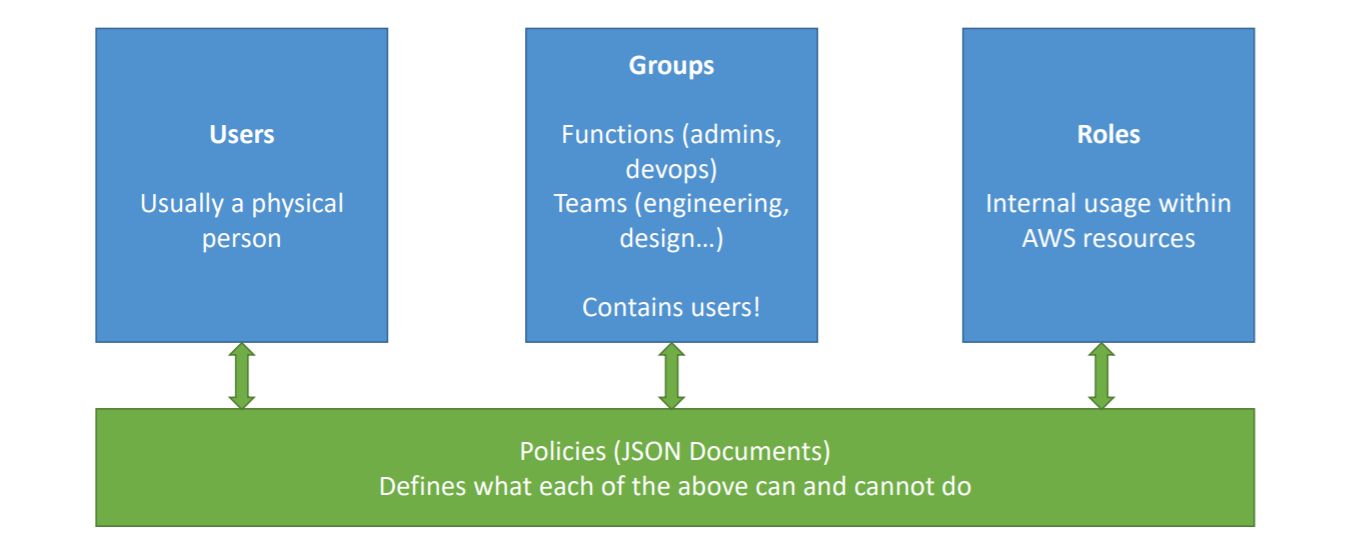
Image source: Stephane Maarek
- IAM has a global view • Permissions are governed by Policies (JSON) • MFA (Multi Factor Authentication) can be setup • IAM has predefined “managed policies” • We’ll see IAM policies in details in the future • It’s best to give users the minimal amount of permissions they need to perform their job (least privilege principles)
One IAM User per PHYSICAL PERSON
One IAM Role per Application
IAM credentials should NEVER BE SHARED
Never, ever, ever, ever, write IAM credentials in code. EVER.
And even less, NEVER EVER EVER COMMIT YOUR IAM credentials
Never use the ROOT account except for initial setup.
Never use ROOT IAM Credentials.
New users are assigned Access Key ID & Secret Access Keys when first created.
These are not same as password, you can’t use the Access Key ID & Secret keys to login in Console, can use this to access AWS via APIs & Command Line.